From hybrid work setups to secure contractor access and full cloud-based GPU workstations — virtual desktops can be used for a wide variety of use cases.
But no matter how powerful the backend infrastructure is, the user experience ultimately depends on one thing: the real-time delivery of graphics across a network.
For many years I have been measuring the perceived user experience as part of vendor-independent EUC Score benchmarking tests.
And sure enough, under constrained network conditions, users may begin to see strange visual issues — blocky text, blurry screens, frozen frames, or delayed updates.
These screen artifacts can be confusing for users and hard for helpdesk teams to interpret unless everyone shares a common vocabulary.
When the network becomes limited — through low bandwidth, high latency, jitter, or packet loss — the protocol must adapt.
This adaptation leads to visible compromises in image quality or responsiveness.
This article demystifies the most common screen artifacts encountered in virtual desktop environments and mostly caused by network constraints.
Each artifact in the following list includes a short description and can be used to tag EUC Score Sync Player clips.
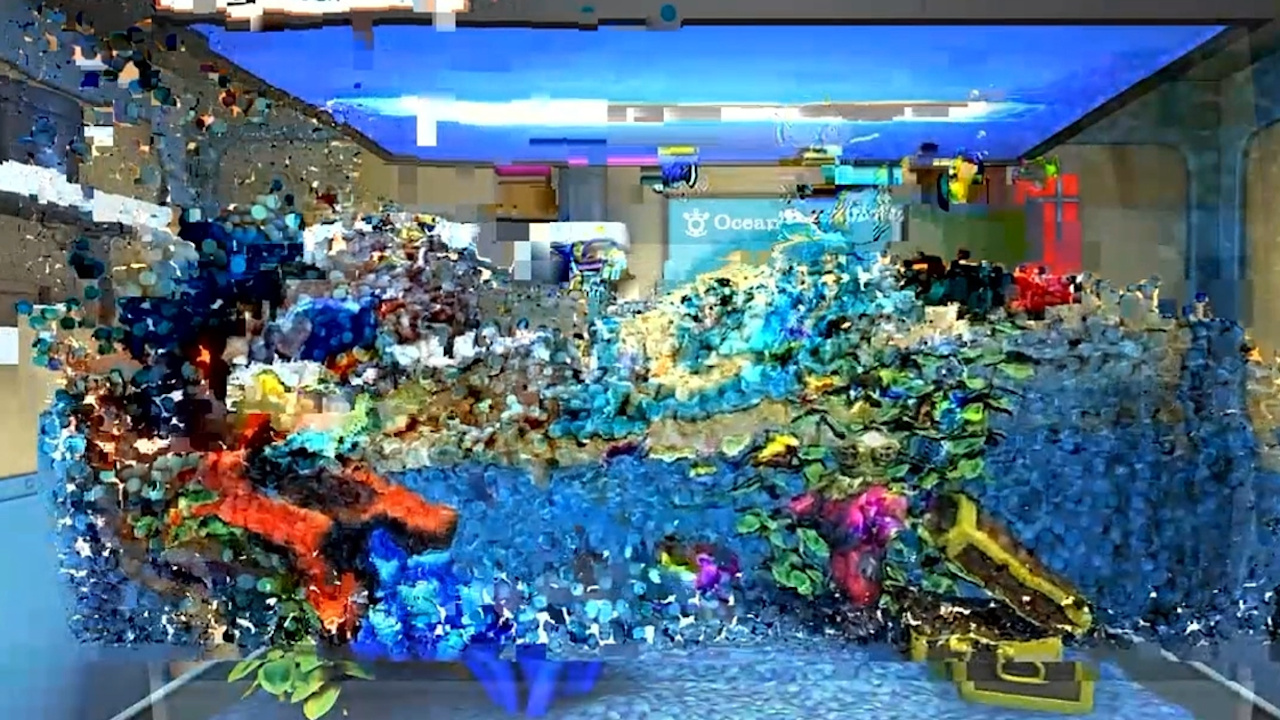
- Blockiness / Block Artifacts: Square blocks appear across the screen, especially when things move quickly. This is caused by low bandwidth. The encoder reduces image quality to keep movement smooth.
- Pixelation: Visual distortion where a video image appears blocky, jagged, or mosaic-like, causing individual pixels to become visible to the naked eye.
- Tiling Artifacts: Visual distortions where the image appears to be broken up into small squares or rectangular blocks. This happens because modern video codecs (like H.264, HEVC, AV1) break frames into smaller rectangular blocks—or "tiles"—and compress them separately to save data.
- Blurriness: Text or UI elements appear soft and small fonts become hard to read. A possible reason is progressive refinement where the remoting protocol is sending a low-quality frame first. Later the frame is updated with a sharper version when bandwidth allows. Under constrained conditions, the refinement may never arrive.
- Smearing: A smearing artifact caused by a lost keyframe is a video corruption issue where previous visual information fails to update. When the "reference frame" (keyframe) is lost or corrupted, the decoder continues applying motion data to old, outdated image data. Smearing may also be caused by restricted bandwidth where the encoder prioritizes motion but reduces temporal accuracy.
- Stuttering: A visual or playback artifact where the screen output appears to skip, jump, or hesitate, making the motion look non-smooth, jerky, or choppy, despite potentially high frame rates.
- Frame Freezing: A single frame forming a motionless screen image. The screen temporarily stops updating or jumps forward suddenly. Network latency or jitter causes new frames to arrive late or out of order.
- Stripe Artifacts: A visual distortion characterized by persistent or intermittent horizontal or vertical lines or bands that do not belong to the original scene. The effect occurs particularly in areas with lots of motion or detail.
- Jitter: Shaky or distorted movement of pixels, frames, or lines caused by inconsistencies in signal transmission, compression, or networking. It appears as flickering, choppy playback, or trembling, often caused by inconsistent packet arrival times over a network (network jitter).
- Flickering: Rapid, unwanted, and often periodic fluctuations in brightness, luminosity, or color intensity. It appears as flashing, strobing, or horizontal dark bands that move across the screen.
- Slow Motion: Playing back video more slowly than it was made or recorded.
- Interlacing Artifacts: Different fields of video don't align correctly, creating horizontal lines.
- Mosquito Noise: A video compression artifact that appears as a shimmering, buzzing, or blotchy distortion concentrated around the sharp edges of objects in a video. It is most commonly associated with MPEG-based compression methods, such as H.264.
- Echoing: A repeating pattern of lines or waves that appear around sharp corners and edges.
- Color Banding: Smooth gradients (like sky or wallpaper) turn into stripes instead of a smooth transition. To save bandwidth, the remoting protocol reduces color depth. This lowers the number of colors available to render gradients.
- Reduced Color Fidelity: Decrease in accuracy with which a display reproduces colors compared to the original scene. It signifies that the colors in the video look unnatural, inaccurate, or different from reality.
- Screen Update Errors: Parts of the screen stop updating while others continue. Some remoting protocols update the screen in regions. If some regions fail to transmit (due to packet loss), they freeze while others continue updating.
- Motion Blur: Unintended blurring during movement.
- Ghosting: Dragging windows or moving the cursor leaves a trail behind them. Old frames blend into new ones, creating ghost-like trails.
- Empty Regions: Sections of the screen show black boxes or placeholders. When parts of an encoded frame are lost or corrupted, the client displays empty regions to avoid drawing outdated content.
- Tearing: Partial-frame updates. The top half of the screen appears "older" than the bottom half. A window may appear split or diagonally mismatched. Frames are delivered in pieces. Under unstable networks, portions of the screen may update at slightly different times.
- Color Look-Up Table Error: A technical glitch that occurs primarily in older computer-animated media or digital animation that uses indexed color palettes rather than full 24-bit color.
Below are some examples of artifacts as listed.
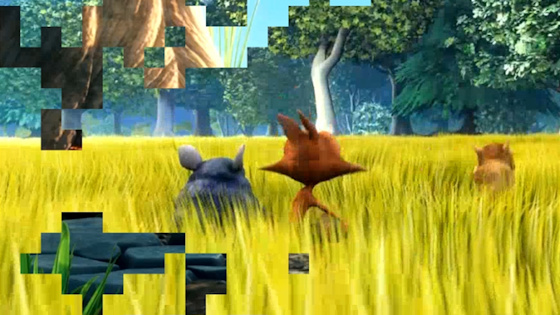 Blockiness
 |
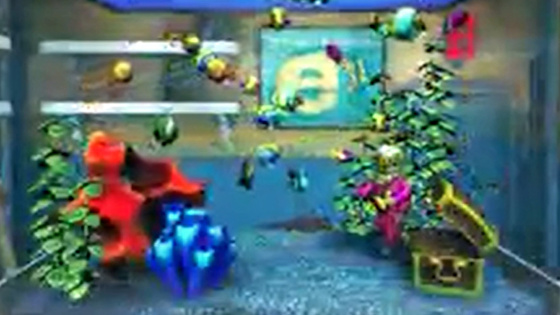 Blurriness
 |
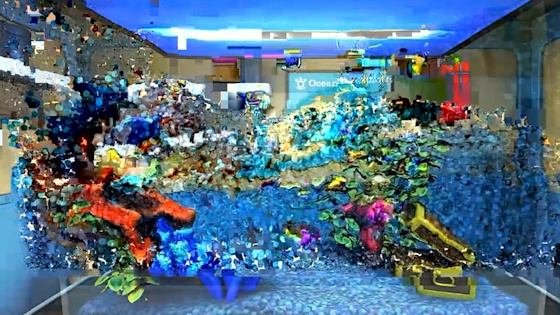 Smearing
 |
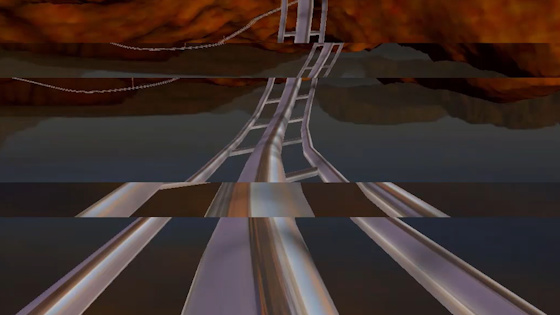 Stripe Artifacts
 |
SUMMARY: Virtual desktop visual quality is directly tied to network performance. Under constrained conditions, users may encounter artifacts such as
blockiness, blurriness, ghosting, missing regions, or frame freezing. Understanding what each artifact looks like — and what causes it — is essential
for faster troubleshooting and better user communication.
With the right analytical approach and infrastructure tuning, most of these issues can be mitigated or eliminated to a certain extend.
 Benny Tritsch
31 Mar 2026
Benny Tritsch
31 Mar 2026